You are not logged in.
- Topics: Active | Unanswered
#26 Re: GTA Modding » haveing a problem with sanny bilder » 28-06-2010 20:36
ok the "read only" thing is not the problem, i have nothing selected, it dose open with IMG tool, dose that matter? :wow: other wise i have everything checked out...thanks in advance DR
open sanny and click at right lower corner on to the gta icon and choose VC
then set the game path in sanny options
then use open or decompile function to open the main.scm
#27 Re: GTA Modding » CLEO 3 Library (issues and solutions) » 15-05-2010 12:43
Hey there!
Im sam and i have a problem with CLEO
i have v1.0 of GTA SA the euro version and it crashes my SAMP
I really want ELM to work are there any ways of me able to get the american
files? i really want them D:
download
GTA: San Andreas v1.0 [ALL] No-CD/Fixed EXE
at gamecopyworld
but SAMP don't supports Cleo
#28 Re: GTA Modding » Arrays » 01-05-2010 12:51
Yes I written that in this mod version 1.0 and later (1.2) but when i used it in SAMP, when music were changing it was making big lags. So i thought about loading it at start. I got enough RAM i think... And i need twenty slots. Could you help me with those arrays?
Hmmm...difficult and complex because we must use locals in cleo and a local can contain max 2 byte but we need 16 byte for the 16 byte string.
------------------------------------------------------------------------------------
Ok, first let explain how to use local arrays
As you know is an array construct like a family with childs
and the Index of the Family defines which part of the family is meant
Family[index 0] = father
Family[index 1] = mother
Family[index 2] = son
Family[index 3] = doughter
Family[index 4] = Carl
Family[index 1] goes in the kitchen
means:
mother goes in the kitchen
Lets go to GTA and local variables
We can use the same variable in the array construct
but we [large]must reserve more local variables[/large]
6@[index 0] = father
6@[index 1] = mother
6@[index 2] = son
6@[index 3] = doughter
6@[index 4] = Carl
[large]the assignment of ascending index values uses new locals in ascending order[/large]
6@ = father
7@ = mother
8@ = son
9@ = doughter
10@ = Carl
the array construct:
6@(30@,5i)
30@ is the array index
example:
we define the value of the index:
0006: 30@ = 4
now
6@(30@,5i) goes in the kitchen
means
Carl goes in the kitchen
its the same like:
10@ goes in the kitchen
6@, 7@, 8@, 9@, 10@ can't be used for other function in the script
6@, 7@, 8@, 9@, 10@ must be reserve for the arrays
example:
after each pickup spawn we add 1 to the array index
000A: 30@ += 1
{$CLEO .cs}
:Array_items1
03A4: name_thread 'Array_1'

0006: 6@ = 1239  // info
0006: 7@ = 1240  // health
0006: 8@ = 1241  // adrenaline
0006: 9@ = 1242  // bodyarmour
0006: 10@ = 1247  //bribe

0006: 30@ = 0  // ---Array Index is 0
0213: 0@ = create_pickup 6@(30@,5i) type 15 at 2490.0 -1662.0 13.5

000A: 30@ += 1// ---Array Index is 1
0213: 1@ = create_pickup 6@(30@,5i) type 15 at 2492.0 -1662.0 13.5

000A: 30@ += 1// ---Array Index is 2
0213: 2@ = create_pickup 6@(30@,5i) type 15 at 2494.0 -1662.0 13.5

000A: 30@ += 1// ---Array Index is 3
0213: 3@ = create_pickup 6@(30@,5i) type 15 at 2496.0 -1662.0 13.5

000A: 30@ += 1// ---Array Index is 4
0213: 4@ = create_pickup 6@(30@,5i) type 15 at 2498.0 -1662.0 13.5

0A93: end_custom_thread
------------------------------------------------------------------------------------
Next problem: a 16 byte string can contain max 10 charackter
It needs to use the method which Deji showed above
Or reduce the content of the string
So place your playlist folder in the game root directory and rename the folder to a shorter name
For following examples I placed the files in GTASA\P
0AAB: file_exists "P\01.MP3"
the script could look now in this kind
{$CLEO .cs}

//-------------MAIN---------------
03A4: name_thread 'PLAYLIST'
0001: wait 1000 ms
06D2: 0@v = "P\01.MP3" // @v = string
06D2: 4@v = "P\02.MP3" // @v = string
06D2: 8@v = "P\03.MP3" // @v = string
06D2: 12@v = "P\04.MP3" // @v = string
06D2: 16@v = "P\05.MP3" // @v = string
0006: 31@ = 0

:PLAYLIST_106
0001: wait 0 ms
00D6: if
0256:   player $PLAYER_CHAR defined
004D: jump_if_false @PLAYLIST_106
0006: 30@ = -1
00D6: if
0AB0:   key_pressed 8
004D: jump_if_false @PLAYLIST_106
00D6: if
0AAB:   file_exists 0@(31@,16v)
004D: jump_if_false @PLAYLIST_106
0AAC: 30@ = load_mp3 0@(31@,16v)
00D6: if
8039:   not  30@ == -1
004D: jump_if_false @PLAYLIST_106
0AAD: set_mp3 30@ perform_action 1
0001: wait 1000 ms

:PLAYLIST_210
0001: wait 0 ms
00D6: if
0256:   player $PLAYER_CHAR defined
004D: jump_if_false @PLAYLIST_245
00D6: if
0AB0:   key_pressed 8
004D: jump_if_false @PLAYLIST_210

:PLAYLIST_245
0AAD: set_mp3 30@ perform_action 0
0001: wait 0 ms
0AAE: release_mp3 30@
000A: 31@ += 4
0002: jump @PLAYLIST_106
But you will see that it only plays 0@v and 16@v
It's not possible with a CS file to shift more than 2 filepaths into arrays
It requires a missionscript *.CM which allows to use 1000 locals
------------------------------------------------------------------------------------
The missionscript *.CM is the only way to realize your plan in a stable way
the mission starter script
{$CLEO .cs}
03A4: name_thread 'MSTART'
wait  3000

:M_Start_2
0001: wait  0 ms
00D6: if  0
0256:   player $PLAYER_CHAR defined
004D: jump_if_false @M_Start_2
00D6: if  0
0038:   $ONMISSION ==  0  // integer values
004D: jump_if_false @M_Start_2
00BA: text_styled 'fem_on'  1000 ms  4
0001: wait  500 ms

0004: $ONMISSION =  1  // integer values
0A94: start_custom_mission "mp3_playlist"
0001: wait  500 ms

0002: jump @M_Start_2
The missionscript *.CM must be compiled as [large]mp3_playlist.cm[/large]
like the entry of opcode 0A94: in the starter script
{$CLEO .cm}
thread 'PLAYLIST'
0050: gosub @PlayMPlist_main_1
0AAD: set_mp3 500@ perform_action 0
wait 0
0AAE: release_mp3 500@
0004: $ONMISSION =  0
004E: end_thread

:PlayMPlist_main_1
06D2: 50@v = "P\01.MP3" // @v = string
06D2: 66@v = "P\02.MP3" // @v = string
06D2: 82@v = "P\03.MP3" // @v = string
06D2: 98@v = "P\04.MP3" // @v = string
06D2: 114@v = "P\05.MP3" // @v = string
06D2: 130@v = "P\06.MP3" // @v = string
06D2: 146@v = "P\07.MP3" // @v = string
06D2: 162@v = "P\08.MP3" // @v = string
06D2: 178@v = "P\09.MP3" // @v = string
06D2: 194@v = "P\10.MP3" // @v = string
555@ = 0

:PlayMPlist_11
wait 0
500@ = -1
if
0AB0:   key_pressed 8//-- backspace
jf @PlayMPlist_11
if
0AAB:   file_exists 50@(555@,16v)
jf @PlayMPlist_11
0AAC: 500@ = load_mp3 50@(555@,16v)
if
   not 500@ == -1
jf @PlayMPlist_11
0AAD: set_mp3 500@ perform_action 1
wait 1000

:PlayMPlist_184
wait 0
if
0AB0:   key_pressed 8//-- backspace
jf @PlayMPlist_184

:PlayMPlist_252
0AAD: set_mp3 500@ perform_action 0
wait 0
0AAE: release_mp3 500@
555@ += 4
if
555@ > 36
jf @PlayMPlist_11
555@ = 0
jump @PlayMPlist_11
the array index must be increased by 4 to submit the next array content
------------------------------------------------------------------------------------
Fazit:
To shift file name paths into arrays makes no sense
You can use a very easy method to select the mp3 files
With jumptable for example:
{$CLEO .cs}

//-------------MAIN---------------
03A4: name_thread 'PLAYLIST'
0001: wait 1000 ms
0006: 31@ = 0

:PLAYLIST_106
0001: wait 0 ms
00D6: if
0256:   player $PLAYER_CHAR defined
004D: jump_if_false @PLAYLIST_106
0006: 30@ = -1
00D6: if
0AB0:   key_pressed 8
004D: jump_if_false @PLAYLIST_106
0050: gosub @PLAYLIST_Jumptable
00D6: if
0AAB:   file_exists 0@v
004D: jump_if_false @PLAYLIST_106
0AAC: 30@ = load_mp3 0@v
00D6: if
8039:   not  30@ == -1
004D: jump_if_false @PLAYLIST_106
0AAD: set_mp3 30@ perform_action 1
0001: wait 1000 ms

:PLAYLIST_210
0001: wait 0 ms
00D6: if
0256:   player $PLAYER_CHAR defined
004D: jump_if_false @PLAYLIST_245
00D6: if
0AB0:   key_pressed 8
004D: jump_if_false @PLAYLIST_210

:PLAYLIST_245
0AAD: set_mp3 30@ perform_action 0
0001: wait 0 ms
0AAE: release_mp3 30@
000A: 31@ += 1
if
31@ > 9
jf @PLAYLIST_106
31@ = 0
0002: jump @PLAYLIST_106

:PLAYLIST_Jumptable
0871: init_jump_table 31@ total_jumps  11  0 @MPJUMP_00 jumps  0 @MPJUMP_01  1 @MPJUMP_11  2 @MPJUMP_22  3 @MPJUMP_33  4 @MPJUMP_44  5 @MPJUMP_55 6 @MPJUMP_66
0872: jump_table_jumps  7 @MPJUMP_77  8 @MPJUMP_88  9 @MPJUMP_99  -1 @MPJUMP_00  -1 @MPJUMP_00  -1 @MPJUMP_00  -1 @MPJUMP_00  -1 @MPJUMP_00  -1 @MPJUMP_00

:MPJUMP_00
06D2: 0@v = "P\01.MP3" // @v = string
0002: jump @MPJUMP_end

:MPJUMP_01
06D2: 0@v = "P\01.MP3" // @v = string
0002: jump @MPJUMP_end

:MPJUMP_11
06D2: 0@v = "P\02.MP3" // @v = string
0002: jump @MPJUMP_end

:MPJUMP_22
06D2: 0@v = "P\03.MP3" // @v = string
0002: jump @MPJUMP_end

:MPJUMP_33
06D2: 0@v = "P\04.MP3" // @v = string
0002: jump @MPJUMP_end

:MPJUMP_44
06D2: 0@v = "P\05.MP3" // @v = string
0002: jump @MPJUMP_end

:MPJUMP_55
06D2: 0@v = "P\06.MP3" // @v = string
0002: jump @MPJUMP_end

:MPJUMP_66
06D2: 0@v = "P\07.MP3" // @v = string
0002: jump @MPJUMP_end

:MPJUMP_77
06D2: 0@v = "P\08.MP3" // @v = string
0002: jump @MPJUMP_end

:MPJUMP_88
06D2: 0@v = "P\09.MP3" // @v = string
0002: jump @MPJUMP_end

:MPJUMP_99
06D2: 0@v = "P\10.MP3" // @v = string
0002: jump @MPJUMP_end

:MPJUMP_end
0051: return
#29 Re: GTA Modding » Arrays » 29-04-2010 17:29
Sorry Deji, but i don't understand you and i used global variables...
But it's still crashing, could you point me where I'm wrong?
Don't use globals in cleo!
it can cause bugs and crashs
Fourthermore the mp3 funktion of cleo 3 is not stable at all.
Seemann recomand to load and play only one mp3 and unload it first to can load the next one.
use opcodes 0AAD and 0AAE
{$CLEO .cs}
:Music_mp3
thread 'Music'

:Music_1
wait 0
1@ = -1
if
0AB0:   key_pressed 8//-------press Backspace key
jf @Music_1
0AAC: 1@ = load_mp3 "CLEO\music\track.mp3"
if
8039:   NOT   1@ ==  -1
jf @Music_1
0AAD: set_mp3 1@ perform_action 1
wait 250000
0AAD: set_mp3 1@ perform_action 0
wait 0
0AAE: release_mp3 1@
jump @Music_1
#30 Re: GTA Modding » CLEO 4. Questions and bug reports. » 17-04-2010 09:44
Problem with Onmission state and save script.
I installed cleo 4.1 setup.exe, downloaded here
When I make savegame with my savescript and then load this savegame the Onmission state is aktiv: $ONMISSION = 1
Furthermore it crashes sometimes when I have the script in cleo folder
So much $ONMISSION = 0 and $ONMISSION = 1 in my script
Yes its nesssary. Otherwise the colored gangwar teritories will not be shown if a save was done while gangwar is activ.
It works fine with cleo 3
(The savepoint of the script below is in the Atrium of Los Santos/Commerce)
{$CLEO .cs}
:SAVE_1
03A4: name_thread 'SAVE'
0A95: enable_thread_saving
0570: 1@ = create_asset_radar_marker_with_icon 35 at 1722.2682 -1647.6366 42.4687
018B: show_on_radar 1@ 2

:SAVE_2
0001: wait 0 ms
0213: 2@ = create_pickup 1277 type 3 at 1720.7397 -1645.6292 20.2267

:SAVE_5
0001: wait 0 ms
00D6: if 0
0256: player $PLAYER_CHAR defined
004D: jump_if_false @SAVE_5
00D6: if 0
0214: pickup 2@ picked_up
004D: jump_if_false @SAVE_5
0050: gosub @SAVE_14
0002: jump @SAVE_2

:SAVE_14
00D6: if  0
0038:   $ONMISSION ==  0  // integer values
004D: jump_if_false @SAVE_17
0004: $ONMISSION =  1  // integer values
01B4: set_player $PLAYER_CHAR frozen_state  0 (frozen)
0001: wait  350 ms
03D8: show_SAVE_screen

:SAVE_15
00D6: if  0
83D9:   NOT   save_done
004D: jump_if_false @SAVE_16
0001: wait  0 ms
0002: jump @SAVE_15

:SAVE_16
00A1: put_actor $PLAYER_ACTOR at 1724.3228 -1646.5193 20.2272
0173: set_actor $PLAYER_ACTOR z_angle_to 176.8
01B4: set_player $PLAYER_CHAR frozen_state  1 (unfrozen)
0004: $ONMISSION =  1  // integer values
0001: wait  350 ms
0004: $ONMISSION =  0  // integer values

:SAVE_17
0051: return
#31 Re: Sanny Builder и CLEO » CLEO 4 для GTA San Andreas » 07-03-2010 12:21
The alternative link.
@FeniX-256 - возможно, игру роняет какой-то другой плагин. Попробуй удалить все cleo\*.cleo и *.asi файлы.
With the fxt of my 2 mods, Pimpmycar and Carsaloon the game won't start.
It's because of an very long string:
Pz_CA1 Camera-Controle-key press:~n~(PageUp/Bild Auf) = up~n~(Insert/Einfueg) = down~n~(Delete/Entfern) = turn left~n~(PageDown/Bild Ab) = turn right~n~(Home/Pos1) = foreward~n~(End) = backward~n~(num -)or(look right) = swing Up~n~(num +)or(look left) = swing Down~n~additional (F12) to speed up the movement
There will be an official release on http://cleo.sannybuilder.com/ ?
#32 Re: GTA Modding » Need some help » 08-01-2010 18:17
And i have a problem ,when i want the actor to perform a animation in air ,and move 10 m forward .It moves but like a magnet ,if i turn around it still goes that location ,i mean it doesn't go in front of the player ,it goes in "the map" forward .I don't know how to explain it .
How to move the actor forward ? like
if and
key pressed...
actor in air
as actor perform animation.....
set velocity to (i want to always go forward but i can't )Hep please with both of these ,really need it

the opcode 083C: set_actor $PLAYER_ACTOR velocity_in_direction_XYZ 5@ 6@ 8@
don't requires coords of world-axis as xyz-param
and also not offset-values in relation to player axis
it requires a mix of both
test the airswim script below
press backspace to start airswim
use arrow keys forward, left, right to steer
{$CLEO .cs}
:Airswim2
03A4: name_thread 'AirMV'

018A: 29@ = create_checkpoint_at -2026.1396 138.857 28.8
0165: set_marker 29@ color_to  0

:Airswim2_01
0001: wait  0 ms
00D6: if  0
0256:   player $PLAYER_CHAR defined
004D: jump_if_false @Airswim2_01
00D6: if 0
0AB0:   key_pressed 8
004D: jump_if_false @Airswim2_01

04ED: load_animation "SWIM"

:Airswim2_03
0001: wait  0 ms
if
04EE:   animation "SWIM" loaded
004D: jump_if_false @Airswim2_03
083C: set_actor $PLAYER_ACTOR velocity_in_direction_XYZ 0.0 0.0 50.0
0001: wait  1000 ms
0812: unknown_action_sequence $PLAYER_ACTOR "Swim_Breast" from_file "SWIM"  1.0  1  1  1  1 -2

:Airswim2_05
0001: wait  0 ms
00D6: if  0
0256:   player $PLAYER_CHAR defined
004D: jump_if_false @Airswim2_05
0172: 30@ = actor $PLAYER_ACTOR z_angle
0007: 4@ =  1.0  // floating-point values
0007: 8@ =  1.0  // floating-point values
if
00E1:   key_pressed 0 6
004D: jump_if_false @Airswim2_07
0007: 8@ =  5.0  // floating-point values

:Airswim2_07
00D6: if 0
0AB0:   key_pressed 39
004D: jump_if_false @Airswim2_08
0172: 30@ = actor $PLAYER_ACTOR z_angle
000F: 30@ -=  8.5  // floating-point values
0173: set_actor $PLAYER_ACTOR z_angle_to  30@
0002: jump @Airswim2_09

:Airswim2_08
00D6: if 0
0AB0:   key_pressed 37
004D: jump_if_false @Airswim2_09
0172: 30@ = actor $PLAYER_ACTOR z_angle
000B: 30@ +=  8.5  // floating-point values
0173: set_actor $PLAYER_ACTOR z_angle_to  30@
0002: jump @Airswim2_09

:Airswim2_09
if
0AB0:   key_pressed 38
004D: jump_if_false @Airswim2_010
0007: 4@ =  20.0  // floating-point values
0002: jump @Airswim2_010


:Airswim2_010
02F6: 5@ = cosine 30@  // sinus swapped with cosine
02F7: 6@ = sinus 30@ // cosine swapped with sinus
006B: 5@ *= 4@  // floating-point values
006B: 6@ *= 4@  // floating-point values
0013: 5@ *=  -1.0  // floating-point values
083C: set_actor $PLAYER_ACTOR velocity_in_direction_XYZ 5@ 6@ 8@

if  and
8AB0:   not key_pressed 8
0611:  actor $PLAYER_ACTOR animation == "Swim_Breast"
004D: jump_if_false @Airswim2_13
0002: jump @Airswim2_05

:Airswim2_13
0792: disembark_instantly_actor $PLAYER_ACTOR
04EF: release_animation "SWIM"
0001: wait  1000 ms
0002: jump @Airswim2_01
#33 Re: GTA Modding » HUGE retarded problem » 08-01-2010 18:04
Anyone ... ?
opcode 083C: should run in a loop
or just try this:
04C4: store_coords_to 4@ 5@ 6@ from_actor $PLAYER_ACTOR with_offset 0.0 25.0 0.0
0063: 4@ -= 1@ // (float)
0063: 5@ -= 2@ // (float)
083C: set_actor $PLAYER_ACTOR velocity_in_direction_XYZ 4@ 5@ 90.0
wait 250
083C: set_actor $PLAYER_ACTOR velocity_in_direction_XYZ 4@ 5@ 90.0
wait 250
083C: set_actor $PLAYER_ACTOR velocity_in_direction_XYZ 4@ 5@ 90.0
wait 250
083C: set_actor $PLAYER_ACTOR velocity_in_direction_XYZ 4@ 5@ 90.0
wait 250
083C: set_actor $PLAYER_ACTOR velocity_in_direction_XYZ 4@ 5@ 90.0
wait 250
083C: set_actor $PLAYER_ACTOR velocity_in_direction_XYZ 4@ 5@ 90.0
#34 Re: GTA Modding » Creating a timer » 02-01-2010 21:27
32@, 33@ - aren't these two timers in mission thread?
Yes, there are. I will explain it.
The game supports opcodes to show automatic timers but it needs to insert global variables
and because global can cause bugs and crashes in Cleo I will show first how to display
timers in scripted variation.
This needs to calculate the values of 33@ or 32@ to show minutes and seconds,
for the text number display can be used text_draw opcodes, text_high_priority opcodes or text_style opcodes
I made a little script which invite you to run with your player_actor around the SF-garage in Doherty
Go into the red marker (not that to start the mission) then run to the next red marker and so on
A yellow blip on radar shows you where to run
The first script shows the simple value of 33@
text_draw opcodes are used to show the value
{$CLEO .cs}
:Timeout_1// --- 32@ and 33@ are allways running as script timer in ms and you can catch its value
thread 'Timeout'
018A: 1@ = create_checkpoint_at -2026.2032 139.4361 28.8

:Timeout_3//------------------------------------------------------- first loop
wait 0
if
0256:   player $PLAYER_CHAR defined
jf @Timeout_3
03F0: enable_text_draw 1
045A: text_draw_1number  500.0  200.0 'NUMBER' 33@
if
00FE:   actor $PLAYER_ACTOR  1 (in-sphere)near_point -2026.2032 139.4361 28.83 radius  2.5  2.5  5.5
jf @Timeout_3
Marker.Disable(1@)
018A: 1@ = create_checkpoint_at -2057.0911 139.3797 28.83
33@ = 0// set the timer to 0

:Timeout_5//------------------------------------------------------- second loop
wait 0
if
0256:   player $PLAYER_CHAR defined
jf @Timeout_repeat
03F0: enable_text_draw 1
045A: text_draw_1number  500.0  200.0 'NUMBER' 33@
if
33@ >  4000// check if timer is bigger than 4000ms
jf @Timeout_7
jump @Timeout_repeat

:Timeout_7
if
00FE:   actor $PLAYER_ACTOR  1 (in-sphere)near_point -2057.0911 139.3797 28.83 radius  2.5  2.5  5.5
jf @Timeout_5
Marker.Disable(1@)
018A: 1@ = create_checkpoint_at -2063.8882 184.6683 28.843
33@ = 0// set the timer to 0


:Timeout_9//------------------------------------------------------- third loop
wait 0
if
0256:   player $PLAYER_CHAR defined
jf @Timeout_repeat
03F0: enable_text_draw 1
045A: text_draw_1number  500.0  200.0 'NUMBER' 33@
if
33@ >  5000// check if timer is bigger than 4000ms
jf @Timeout_11
jump @Timeout_repeat

:Timeout_11
if
00FE:   actor $PLAYER_ACTOR  1 (in-sphere)near_point -2063.8882 184.6683 28.843 radius  2.5  2.5  5.5
jf @Timeout_9
Marker.Disable(1@)
018A: 1@ = create_checkpoint_at -2024.1184 180.6013 28.8359
33@ = 0// set the timer to 0

:Timeout_13//------------------------------------------------------- fourth loop
wait 0
if
0256:   player $PLAYER_CHAR defined
jf @Timeout_repeat
03F0: enable_text_draw 1
045A: text_draw_1number  500.0  200.0 'NUMBER' 33@
if
33@ >  5000// check if timer is bigger than 5000ms
jf @Timeout_15
jump @Timeout_repeat

:Timeout_15
if
00FE:   actor $PLAYER_ACTOR  1 (in-sphere)near_point -2024.1184 180.6013 28.8359 radius  2.5  2.5  5.5
jf @Timeout_13
00BA: show_text_styled GXT 'M_PASSD' time 5000 style 1
Marker.Disable(1@)
03F0: enable_text_draw 0
0A93: end_custom_thread//- end by success

:Timeout_repeat//-----------------------refresh
00BA: show_text_styled GXT 'M_FAIL' time 5000 style 1
03F0: enable_text_draw 0
Marker.Disable(1@)
018A: 1@ = create_checkpoint_at -2026.2032 139.4361 28.8
0002: jump @Timeout_3
The next script shows the calculated values of 33@ as seconds and 1/100 of a second
text_draw opcodes are used to show the time
Use the fxt below and insert it into your fxt file
Showt01 SHOWTime: ~1~:~1~
Run again around the SF-garage in Doherty
{$CLEO .cs}
:Showtime_1
thread 'Showtime'
018A: 1@ = create_checkpoint_at -2026.2032 139.4361 28.8

:Showtime_3//------------------------------------------------------- first loop
wait 0
if
0256:   player $PLAYER_CHAR defined
jf @Showtime_3
if
00FE:   actor $PLAYER_ACTOR  1 (in-sphere)near_point -2026.2032 139.4361 28.83 radius  2.5  2.5  5.5
jf @Showtime_3
Marker.Disable(1@)
018A: 1@ = create_checkpoint_at -2057.0911 139.3797 28.83
33@ = 0
26@ = 4000//----countdownt start value in ms

:Showtime_5//------------------------------------------------------- second loop
wait 0
if
0256:   player $PLAYER_CHAR defined
jf @Showtime_repeat
gosub @Showtime_text_draw//---------- gosub to the display setting
if
33@ >  4000//-- must be equal to the previous countdownt start value
jf @Showtime_7
jump @Showtime_repeat

:Showtime_7
if
00FE:   actor $PLAYER_ACTOR  1 (in-sphere)near_point -2057.0911 139.3797 28.83 radius  2.5  2.5  5.5
jf @Showtime_5
Marker.Disable(1@)
018A: 1@ = create_checkpoint_at -2063.8882 184.6683 28.843
33@ = 0
26@ = 5000//----countdownt start value in ms

:Showtime_9//------------------------------------------------------- third loop
wait 0
if
0256:   player $PLAYER_CHAR defined
jf @Showtime_repeat
gosub @Showtime_text_draw//---------- gosub to the display setting
if
33@ >  5000//-- must be equal to the previous countdownt start value
jf @Showtime_11
jump @Showtime_repeat

:Showtime_11
if
00FE:   actor $PLAYER_ACTOR  1 (in-sphere)near_point -2063.8882 184.6683 28.843 radius  2.5  2.5  5.5
jf @Showtime_9
Marker.Disable(1@)
018A: 1@ = create_checkpoint_at -2024.1184 180.6013 28.8359
33@ = 0
26@ = 5000//----countdownt start value in ms

:Showtime_13//------------------------------------------------------- fourth loop
wait 0
if
0256:   player $PLAYER_CHAR defined
jf @Showtime_repeat
gosub @Showtime_text_draw//---------- gosub to the display setting
if
33@ >  5000//-- must be equal to the previous countdownt start value
jf @Showtime_15
jump @Showtime_repeat

:Showtime_15
if
00FE:   actor $PLAYER_ACTOR  1 (in-sphere)near_point -2024.1184 180.6013 28.8359 radius  2.5  2.5  5.5
jf @Showtime_13
00BA: show_text_styled GXT 'M_PASSD' time 5000 style 1
Marker.Disable(1@)
03F0: enable_text_draw 0
0A93: end_custom_thread//- end by success

:Showtime_repeat//-----------------------refresh
00BA: show_text_styled GXT 'M_FAIL' time 5000 style 1
03F0: enable_text_draw 0
Marker.Disable(1@)
018A: 1@ = create_checkpoint_at -2026.2032 139.4361 28.8
0002: jump @Showtime_3


:Showtime_text_draw//------------------------------- subscript
0085: 31@ = 33@ // make a local equal to the timer 33@
0085: 30@ = 33@ // make one more local equal to the timer 33@

0085: 28@ = 26@ // make a local equal to the countdownt start value which show the seconds
28@ /= 1000
31@ /= 1000
0062: 28@ -= 31@

0085: 27@ = 26@ // make one more local equal to the countdownt start value which show parts of seconds
27@ /= 10
30@ /= 10
0062: 27@ -= 30@

03F0: enable_text_draw 1
0340: set_text_draw_RGBA 0 64 255 255
033F: set_text_draw_letter_size 0.5 3.0
0343: set_text_draw_linewidth 640.0
045B: draw_text_2numbers 450.0 200.0 GXT 'SHOWT01' numbers 28@ 27@

return
Instead text_draw opcodes can also be used text_high_priority opcodes
replace
03F0: enable_text_draw 1
0340: set_text_draw_RGBA 0 64 255 255
033F: set_text_draw_letter_size 0.5 3.0
0343: set_text_draw_linewidth 640.0
045B: draw_text_2numbers 450.0 200.0 GXT 'SHOWT01' numbers 28@ 27@
with
02FD: show_text_2numbers_lowpriority GXT 'Showt01' numbers 28@ 27@ time 10 flag 1
or use text_style opcodes and replace it with
036D: show_text_2numbers_styled GXT 'Showt01' numbers 28@ 27@ time 5 style 6
As I said above can also be used an automatic timer but it needs to use global variables
You need first to declare the value then start the timer.
Use stop timer at the end to remove the reference of the timer and of the variable
type 1 counts in descending order and type 0 counts in ascending order
{$CLEO .cs}
:Timer_1
thread 'TIMER'
0004: $time2 =  90000  // integer values
014E: set_timer_to $time2 type  1

:Timer_2
wait 0
if
$time2 == 0
jf @Timer_2
014F: stop_timer $time2
00BA: show_text_styled GXT 'fem_off' time 1000 style 1
0A93: end_custom_thread
For the timer exist also a version which show a text
replace
014E: set_timer_to $time2 type 1
with
03C3: set_timer_to $time2 type 1 GXT 'Showt01' // global_variable // Time
To make it complete I show also how to use the StatusText or StatusBar opcode
But it needs also to use global variables
At first the StatusText opcode which displays only a value as numbers
It displays not the time but it displays automaticly the value of the global variable
{$CLEO .cs}
:Status_1
thread 'STATUS'
0004: $time2 =  1000  // integer values
03C4: set_status_text $time2 type 0 GXT 'Showt01' // global_variable  // Score ~1~

:Status_2
wait 0
$time2 -= 1
if
$time2 == 0
jf @Status_2
0151: remove_status_text $time2
00BA: show_text_styled GXT 'fem_off' time 1000 style 1
0A93: end_custom_thread
type 0 shows the value as numbers
type 1 shows the value as an bar
also there exist other opcodes to displays more StatusTexts or StatusBars
in more rows among each other
for the statusBar you must consider that a full bar have allways the value 100
and to show the correct bar needs to calculate the value relativ to 100
in other words: the bar shows percents
{$CLEO .cs}
:Status2_1
thread 'STATUS2'
0004: $time1 =  100  // integer values
0004: $time2 =  1000  // integer values
04F7: status_text $time1 type 1 line 1 GXT 'Showt01' // global_variable  // Score
04F7: status_text $time2 type 0 line 2 GXT 'Showt01' // global_variable  // Score

:Status2_2
wait 0
$time2 -= 1
0084: $time1 = $time2
$time1 /= 10
if
$time2 == 0
jf @Status2_2
0151: remove_status_text $time1
0151: remove_status_text $time2
00BA: show_text_styled GXT 'fem_off' time 1000 style 1
0A93: end_custom_thread
#35 Re: GTA Modding » Speedometer without gasoline » 29-08-2009 21:14
Hey,
I found a very nice speedometer on the internet, but it also has got a gasoline mod.
Your cars run out of gas very quickly with this mod.
I wondered if someone could edit the CLEO script so that only the speedometer would work, and not the gasoline mod.
Here's a link to the GSN Mod: http://yelmi.com/modules/files/showfile.php?lid=29
Thanks in advantage!
open gasoline_NEW.cs with sannybuilder
and search for this entry:
10@ > 0
should be at linenumber 81 or 82
replace the 10@ with 33@
33@ > 0
#36 Re: GTA Modding » Sanny Builder / CLEO discussion » 04-08-2009 08:17
cleo is not supported by SA:MP
I finally got it working on single player mode with the emergency light mod v5.
thats enough
#37 Re: GTA Modding » Limits » 15-07-2009 09:12
Mission Cleanup List 75
what does it mean ?it's the capacity of the list the hold handles of the objects, actors, car etc created during a mission. When the mission is done this list is cleared after 00D8 and everything in it is destroyed.
damn, so a mission is allways limited to 75 item creations
1.does it include loaded animations?
2.what is the effect if the mission hit this limit?
3.what does 00D8 do exactly? I noticed that it never destroyed created items (markers, pickups exist furthermore if I dont do it myself), but it release the weather, restores traffic and similar envirement settings, restores camera and fades back if screen is black
4.would this be valid?
I use 00D8 to clear the list, when 70 items has been created, to create additional stuff while running mission (the 70 items should be used furthermore)
5.such a list exist only for missions?
simple threads seems to have less capacity
are there any declaration about the capacity of threads?
#38 GTA Modding » Limits » 09-07-2009 08:15
- ZAZ
- Replies: 2
Sanny Builder Help: GTA Limits
for SA
external threads 82
I assume it means installed extern scripts, am I right?
cleo scripts dont belong to that?
external thread attachments 70
what does it mean ?
Mission Cleanup List 75
what does it mean ?
#39 Re: GTA Modding » xxx.xx Coords? » 06-07-2009 17:59
I mean, displaying coordinates on screen... For debugging purposes.
But accurately... Instead of the coordinate 1094.0 you get 1094.99 which is the exact coordinate and would effect the position alot more...
I believe you did it in your DBMU mod... And used some math to get the coordinates accurately. And I can't figure out how you did it... I get lost in the code
it must be integers to show values with text opcodes
convert the coords to integers then you have the values infront of the comma
convert them back but with other variables into floats
now you can subtract the filtered coords from the complete coords to get the values behind comma
exemple:
1234.567 -= 1234.00
result = 0.567
multiplicate the result with 100.0 to get valid integers with the float_to_integer opcode
but these values should not be negativ, so check if they are negativ and if yes multiplicate them with -1
the script below don't show the dot, you have to imagine it.
{$CLEO .cs}
:coords_00
03A4: name_thread 'COO'
0006: 33@ =  0  // integer values
0006: 3@ =  0  // integer values
0006: 4@ =  0  // integer values
0006: 5@ =  0  // integer values
0006: 11@ =  0  // integer values
0006: 12@ =  0  // integer values
0006: 13@ =  0  // integer values
0006: 9@ =  0  // integer values

:coords_01
0001: wait  0 ms
00D6: if  0
0256:   player $PLAYER_CHAR defined
004D: jump_if_false @coords_01
03F0: enable_text_draw 1
045A: text_draw_1number  50.0  425.0 'NUMBER' 3@    // value
045A: text_draw_1number  200.0  425.0 'NUMBER' 4@    // value
045A: text_draw_1number  350.0  425.0 'NUMBER' 5@    // value
045A: text_draw_1number  100.0  425.0 'NUMBER' 11@    // value
045A: text_draw_1number  250.0  425.0 'NUMBER' 12@    // value
045A: text_draw_1number  400.0  425.0 'NUMBER' 13@    // value
045A: text_draw_1number  450.0  425.0 'NUMBER' 9@    // value
if
0019:   33@ >  1000  // integer values
004D: jump_if_false @coords_01
0006: 33@ =  0  // integer values
00A0: store actor $PLAYER_ACTOR position to 0@ 1@ 2@
0092: 3@ = float_to_integer 0@
0092: 4@ = float_to_integer 1@
0092: 5@ = float_to_integer 2@

0093: 6@ = integer_to_float 3@
0093: 7@ = integer_to_float 4@
0093: 8@ = integer_to_float 5@

0063: 0@ -= 6@  // floating-point values
0063: 1@ -= 7@  // floating-point values
0063: 2@ -= 8@  // floating-point values
0013: 0@ *=  100.0  // floating-point values
0013: 1@ *=  100.0  // floating-point values
0013: 2@ *=  100.0  // floating-point values

0092: 11@ = float_to_integer 0@
0092: 12@ = float_to_integer 1@
0092: 13@ = float_to_integer 2@

:coords_02
00D6: if  0
001B:    0 > 11@  // integer values
004D: jump_if_false @coords_03
0012: 11@ *= -1  // integer values

:coords_03
00D6: if  0
001B:    0 > 12@  // integer values
004D: jump_if_false @coords_04
0012: 12@ *= -1  // integer values

:coords_04
00D6: if  0
001B:    0 > 13@  // integer values
004D: jump_if_false @coords_05
0012: 13@ *= -1  // integer values

:coords_05
0172: 9@ = actor $PLAYER_ACTOR z_angle
0092: 9@ = float_to_integer 9@
0002: jump @coords_01
#40 Re: GTA Modding » Replace the audio' files » 07-04-2009 21:42
I hope it will be present in the next version of openIV!
I confirm. I wonna have an other sound for peep if somebody killed an other in MP
#41 Re: GTA Modding » Replace the audio' files » 07-04-2009 19:11
Hello,
I'm making a mod, and I'd like to replace some audio files (especially the radio files), but it's impossible (so i'm stuck):
-to convert a .wav in a .ivaud
-to import the fileSo Is what can be done in the next version?
Thank's dudes!
Do you mean San Andreas?
If yes, you need SAAT
The audio files of audio\stream are *.ogg files also the radio files
The audio files of audio\sfx are *.wav files
#42 Re: GTA Modding » CLEO 3 Library (issues and solutions) » 29-03-2009 18:17
Do you know that the car stuck check dont work in Cleo? If youre interessing I can post exemple scripts.
#43 GTA Modding » ~ CLEO Script Tutorial ~ » 21-03-2009 12:53
- ZAZ
- Replies: 7
CLEO Script Tutorial
//////////////////////////////////////////////////////////////////////////////////////////////////////////////////////////////////////////////////////////////////
//////////////////////////////////////////////////////////////////////////////////////////////////////////////////////////////////////////////////////////////////
off topic:
CLEO GIRL GFXXX
//////////////////////////////////////////////////////////////////////////////////////////////////////////////////////////////////////////////////////////////////
INDEX
-First Steps in Cleo scripting with Sannybuilder
---------------------------------------
-The Editor
-Option: different view of the decompiled code
-Classes and Keywords
-Data types
---------------------------------------
-Scripting/Writing a Thread
-Using conditional checks
-The IF - Variation
- Script structure simple
- Script structure extended
-Script exemble: Slowmotion
-Spawn a 3D model
-Placing cars by using parked_car_generator
---------------------------------------
-Special Particularities in Cleo
---------------------------------------
-Script Exemble by using Special Global Cleo Variable/ Store a car at any place
-Template for Cleo Mission Script
-gosub
//////////////////////////////////////////////////////////////////////////////////////////////////////////////////////////////////////////////////////////////////
First Steps in Cleo scripting with Sannybuilder
Download newest version of Sannybuilder from Seemann at http://sannybuilder.com/
Install Sannybuilder and create a folder for your scripts
Therefor youre promt to indicate your GTASA-Install dir.
Then start Sannybuilder,
Open a new blank page, copy the script below and insert it into the new page.
{$CLEO .cs}
:DEMOTEXT
03A4: name_thread "DEMO"
wait 1000

:DEMOTEXT_1
wait 0
if
0256:   player $PLAYER_CHAR defined
004D: jump_if_false @DEMOTEXT_1
if
00E1:   key_pressed  0  17
004D: jump_if_false @DEMOTEXT_1
00BA: text_styled 'FEM_OK'  1000 ms  1
0A93: end_custom_thread
Save it in your Sannyscript folder and give it a name.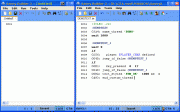
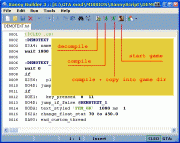
Compile the script. Click on menue icon with "running man" to choose compile + copy
If the CLEO - Library is installed, the script will be compiled and copied in to GTASA\CLEO - folder
The Cleo script file get then the file extension, which is written in the Cleo Script directive at the beginning of the script
{$CLEO .cs} = Cleo directive will be compiled to *.cs
As DEMOTEXT.txt saved and compiled as DEMOTEXT.cs
______________________________________________________________________________________
If CLEO is not installed, then sannybuilder will prompt you to do it and at the lower right corner of the editor
appears the CLEO - box with a red border. Click on it and Sannybuilder installs Cleo immediately.
Or download the cleo auto install exe at http://cleo.sannybuilder.com
______________________________________________________________________________________
If the compiling process was successful you get then a report message
click on OK to confirm
the lower value "Largest Script" shows the script file size
the other values belongs to a compiling process of a main.scm
Test then the script ingame, press fire button to display the text message "OK"
The script ends then, will be deactivated because it ends with opcode 0A93: end_custom_thread
______________________________________________________________________________________
______________________________________________________________________________________
The Editor
The main functions can be found as icon button in the menue bar
1. Decompile: sanny opens script files with extensions .CS, .CM or .SCM
2. Compile: sanny compiles by default to a [Name]main.SCM
Sanny compiles automaticly to Cleoscript files, if the script have a Cleo-Direktive as entry
{$CLEO .cs} = Cleo-Direktive, will be compiled to Name.CS
{$CLEO .cm} = Cleo-Direktive, will be compiled to Name.CM
Useful tools
Choose TOOLS on menue, then IDE Tools >> Coords Manager
to read the x,y,z coordinate and the z-angle of the current player position if the game is running
Choose TOOLS on menue, then IDE Tools >> Opcode Search
to search for opcodes
type any keyword to find a codeline which include this word
or type an opcode to find the description
the foundings are allways existing lines of original main.scm

Line numbers
Choose TOOLS, then options
in option menu EDITOR you can find the feature to switch Line numbers off/on
The line number is part of the editor, not of the script
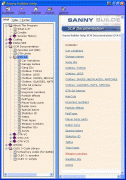
The Sannybuilder HELP
Choose HELP on menue, then Content to find informations,
such like key_press numbers, weapon numbers, bodyparts etc..
______________________________________________________________________________________
______________________________________________________________________________________
Option: different view of the decompiled code
Choose TOOLS, then options
in option menu GENERAL you can find the feature to switch between 2 ways for decompiling
either decompile by writing opcodes
or decompiling without opcodes
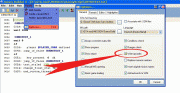
1. Writing Opcodes
All entries are shown with their opcodes
The opcodes are the real programm codes of the script functions
and by showing them is like to see the name of the command
Script with opcodes:
:CARSL_6439
00D6: if
00E1:   player 0 pressed_key 16
004D: jump_if_false @CARSL_6535
010B: 5@ = player $PLAYER_CHAR money
00D6: if
002D:   5@ >= 14@ // (int)
004D: jump_if_false @CARSL_6512
0012: 14@ *= -1
0109: player $PLAYER_CHAR money += 14@
0002: jump @CARSL_6700
2. Without Opcodes
The script is more slim, maybe more clear (but not for me)
especially 004D: jump_if_false will be now jf
But not all opcodes are disappeared. Many codes must be used furthermore by applying their opcodes.
Script without opcodes:
:CARSL_6439
if
00E1:   player 0 pressed_key 16
jf @CARSL_6535
5@ = Player.Money($PLAYER_CHAR)
if
002D:   5@ >= 14@ // (int)
jf @CARSL_6512
14@ *= -1
Player.Money($PLAYER_CHAR) += 14@
jump @CARSL_6700
By compiling it doesnt matter if you use codes with opcodes or without opcodes
You can merge everything and sanny compile it as well,
provided that the code is correct and codelines which includes opcodes by decompiling without opcodes
must be used furthermore by using opcodes
A special feature by decompiling without opcodes is to translate opcode based commands into
Classes and Keywords
For a couple of codes can be used CLASSES
Read more about classes in Sannybuilder-HELP theme: Coding >> Classes
This code by decompiling with writing opcodes
00AB: put_car 22@ at -1577.942 52.6333 40.0
will by shown by decompiling with without opcodes in this kind:
[b]Car[/b].PutAt(22@, -1577.942, 52.6333, 40.0)
the meaning of the code is defined by the class entries
Car= class-name
PutAt= class-member
name and member are combined with a dot in the middle
22@ = class-owner
class-owner and parameters are placed in brackets and separated with comma
(parameter = needed information for the command)
Sanny allows to use some KEYWORDS instead using opcodes
Opcode = Keyword
_____________
0001: = wait
00d6: = if
004d: = else_jump
004d: = jf
0002: = jump
0051: = return
0050: = gosub
016a: = fade
01B6: = set_weather
03a4: = thread
04BB: = select_interior
0417: = start_mission
00d8: = mission_cleanup
0317: = increment_mission_attempts
Instead writing
004D: jump_if_false @MAIN_6
can be written
jf @MAIN_6
or
else_jump @MAIN_6
you also can merge it
004D: jf @MAIN_6
______________________________________________________________________________________
______________________________________________________________________________________
Data types
: (doublepoint) marks a Label (adress)
:MAIN_1
@ is used for 2 different functions
1. in jump instruction to mark the label which should be reached
004D: jump_if_false @SAVE_5
0050: gosub @SAVE_14
0002: jump @SAVE_1
2. to mark LOCAL VARIABLES
The stuff in the game needs a identity for registration to can handle with it
The identities can be variable, for exemble by calculating something
The local variable is builded with the @ sign and a number
0@, 1@, ... 30@ from 0@ up to 31@ is possible, 32@ and 33@ are for timers, thats maximum in an .cs file
1@ defines a parked_car generator
014B: 1@ = init_parked_car_generator #PCJ600 0 17 1 alarm 0 door_lock 0 0 10000 at 2490.0 -1682.0 13.5 angle 90.0
1@ can then be used furthermore as variable name of the parked_car generator
014C: set_parked_car_generator 1@ cars_to_generate_to 101
$ is used to mark a GLOBAL VARIABLE
The stuff in the game needs a identity for registration to can handle with it
The identities can be variable, for exemble by calculating something
The global variable is builded with the $ sign and a a letter or a word or a number or both
But using global variables in Cleo scripts can cause heavy bugs or crashs
only $PLAYER_CHAR, $PLAYER_ACTOR, $ONMISSION are valid
global, local, whats that ?
Global variables are used in the main.scm to communicate between different threads
Local variables are also used in the main.scm but they can not communicate between different threads
You can create a car with a LOCAL variable in a thread as 1@ and also with 1@ in an other thread of main.scm
1@ = create_car
You have then 2 different cars, commanded from 2 different threads
You can create a car with GLOBAL variable in a thread but dont use again the same global to create it again in an other thread.
$mycar5 = create_car
But you can command the car from an other thread of the main.scm by using a GLOBAL variable
At least:
The GLOBAL variables are storable, the LOCAL variables not
But dont using global variables in Cleo scripts because they can cause heavy bugs or crashs
only $PLAYER_CHAR, $PLAYER_ACTOR, $ONMISSION are valid
# marks the connected entry as filename of a loadable model
0247: load_model #BMYCG
0247: load_model #HMYCM
0247: load_model #SWATVAN
0247: load_model #M4
0247: load_model #COLT45
For Cleo can only be used models which are defined in vehicles.ide, peds.ide or default.ide
Other models needs to use their ID number
'...' short string to insert letters or numbers like GXT entrynames or names of special IPL entries
03A4: name_thread 'MAIN'
0917: audio_zone 'BEACH' enable_sound 0
00BA: show_text_styled GXT 'INTRO_1' time 1000 style 2
0299: activate_garage 'MODLAST'
07FB: set_interior 'GYM1' access 1  // Ganton Gym
0390: load_txd_dictionary 'LD_BEAT'
076C: set_zone 'GAN1' gang 1 density_to 25
"..." long string to insert letters or numbers like animation- and IFP file names, bodypart names, particel names, etc...
087B: set_player $PLAYER_CHAR clothes_texture "PLAYER_FACE" model "HEAD" body_part 1
038F: load_texture "DOWN" as 1 // Load dictionary with 0390 first
0605: actor -1 perform_animation_sequence "DAN_LOOP_A" IFP_file "DANCING" 4.0 loop 1 0 0 0 time -1 // versionA
0674: set_car_model #GREENWOO numberplate "GROVE4L_"
0245: set_actor 5@ walk_style_to "GANG2"
064B: 25@ = create_particle "EXPLOSION_MOLOTOV" at 2010.0 -1610.0 16.5 type 1
To set entries of strings equal to variable names must be used special opcodes and extended variable signs
05AA:
05A9:
06D2:
06D1:
furthermore can strings also replaced with variables by using extended variable signs
@s - local-string-variable
05AA: 5@s = 'FEM_OK'
00BC: show_text_highpriority GXT 5@s time 10000 flag 1
s$ - global-string-variable
Attension by using Global vars in cleo scripts, it can cause bugs or crashes!
05A9: s$Actor_Speech_GXT_Reference = 'CATX_UA'  // ~z~Carl, you are a f*cking idiota!
00BC: show_text_highpriority GXT s$Actor_Speech_GXT_Reference time 10000 flag 1
05AA: 5@s = s$Actor_Speech_GXT_Reference
00BC: show_text_highpriority GXT 5@s time 10000 flag 1
@v - local-long-string-variable
06D2: 28@v = "LAPDAN1" // @v = string
0812: AS_actor $PLAYER_ACTOR perform_animation "LAPDAN_P" IFP_file 28@v 1000.0 loopA 0 lockX 0 lockY 0 lockF 1 time -1
v$ - global-long string-variable
Attension by using Global vars in cleo scripts, it can cause bugs or crashes!
06D1: v$1225 = "Bat_block"// 16-byte strings
0605: actor $PLAYER_ACTOR perform_animation_sequence v$1225 from_file "BASEBALL"  4.0  1  0  0  0 -1 ms
______________________________________________________________________________________
______________________________________________________________________________________
Scripting/Writing a Thread
The scripts which are running in GTA are called THREAD
They are defined in the main.scm as thread with the create_thread command or a mission script as mission
As well the Extern scripts of script.img are also threads.
The cleo programm checks if there is .cs file in the Cleo folder
and if yes, it start this script as thread
Script structur / short version:
At first, the head, it beginns with the Cleo directive
{$CLEO .cs}First Label (adress)
:Akt
Then give the thread a name
03A4: name_thread 'AKT'
now put a code inthere which will doing something and then end_custom_thread as last code
its ready then to test it ingame
{$CLEO .cs}
:Akt
03A4: name_thread 'AKT'
08B2: toggle_thermal_vision 1
0A93: end_custom_thread
Script above activates the Infrarot view unless in cutscenes
The script ends then, will be deactivated because it ends with opcode 0A93: end_custom_thread
The script will be started by each loading of savegame or by start new game
______________________________________________________________________________________
Next step / using conditional checks
A conditional check requires minimum 3 opcodes
1. the IF-variation
2. the real question
3. the jump instruction by negation
1. if
2. 0AB0: key_pressed 8
3. 004D: jump_if_false @akt_01
We use the previous script again but now we wonna be able to switch into normal view
Therefore we use a conditional check and build a "LOOP"
Loop means that a jump instruction can send the reading process to a previous adress
I call such an adress "Loop-adress"
Important:
The first opcode after such a Loop-adress must be the wait opcode
mostly wait 0 millisecond
the jump instruction can be a jump instruction by negation
or also a normal jump instruction
004D: jump_if_false @akt_01
or
0002: jump @akt_01
The conditional check of a key press in the script below should be passed by pressing BACKSPACE
{$CLEO .cs}
:Akt
03A4: name_thread 'AKT'
08B2: toggle_thermal_vision 1

:Akt_01//----------------------------Loop adresse
0001: wait 0 ms
if
0AB0:   key_pressed 8
004D: jump_if_false @Akt_01//--------jump instruction by negation
08B2: toggle_thermal_vision 0
0A93: end_custom_thread
Script above activates the Infrarot view and toggle back to normal view by key_press
The reading process is looping as long as BACKSPACE is not pressed
the jump instruction by negation sends the reading process allways to the label :Akt_01
1000 times per second
______________________________________________________________________________________
The IF - Variation
if
00FF:   actor $PLAYER_ACTOR  1 (in-sphere)near_point_on_foot 2493.5  -1682.5  13.35 radius  1.0  1.0  1.0
004D: jump_if_false @Teleport_2
By more than one question in an conditional check requires to determine,
if it means if oror if and
if and
00DF:   actor $PLAYER_ACTOR driving
8119:   NOT   car 0@ wrecked
004D: jump_if_false @AD_5
if or
00E1: key_pressed 0 0
00E1: key_pressed 0 1
00E1: key_pressed 0 14
00E1: key_pressed 0 18
004D: jump_if_false @AD_7
if or
8118:   NOT   actor 7@ dead
8118:   NOT   actor 8@ dead
004D: jump_if_false @AD_25
0002: jump @AD_12
The most question codes can be changed into the opposite question
by changing the ciro of the opcode into 8 and insert "not" into the code line
exemble:
00E1: key_pressed 0 10
and
80E1: NOT key_pressed 0 11
______________________________________________________________________________________
Next Step/ Script structure simple
The previous scripts ended because of the opcode 0A93: end_custom_thread
Instead let the script ending we use a jump instruction at script end to the 1.Loop adress
So the reading process is permanent looping
0002: jump @Akt_01
And since now we add a check in our loop which we add allways after a Loop adress.
It is:
if
0256:   player $PLAYER_CHAR defined
004D: jump_if_false @Akt_01
It should prevent crashes if the player dies or gets arrested
The "IF Player- Defined-check" should allway be the first check in a loop
Script structure simple with 1 Loop:
-Script head
-1.Loop-Adress
-wait code
-IF player_defined-check
-Conditional Check
-Event
-Normal jump instruction to 1.LoopAdress
{$CLEO .cs}
:Akt
03A4: name_thread 'AKT'

:Akt_01
0001: wait 0 ms
if
0256: player $PLAYER_CHAR defined
004D: jump_if_false @Akt_01
if
0AB0:   key_pressed 8//-----------------key = Backspace
004D: jump_if_false @Akt_01
08B2: toggle_thermal_vision 1
0001: wait 3000 ms
08B2: toggle_thermal_vision 0
0002: jump @Akt_01//--------Normal jump instruction to 1.LoopAdress
Script above activates the Infrarot view after key_press
and toggle back to normal view after 3 seconds
______________________________________________________________________________________
Next Step/ Script structure extended
To start an event with our script will change the game state and the conditions.
This needs to redirect the reading process to prevent that the same code will be read again.
Therefore we add a second Loop in the script
Loop 1 - before the event
Loop 2 - after the event
Script structure extended with 2 Loops:
-Script head
-1.Loop-Adress
-wait code
-IF player_defined-check
-Conditional Check
-Event
-2.Loop-Adress
-wait code
-IF player_defined-check
-Conditional Check
-Normal jump instruction to 1.LoopAdress
{$CLEO .cs}
:akt
03A4: name_thread 'AKT'

:akt01//----------------------------1.Loop Adress
0001: wait 0 ms
if
0256:   player $PLAYER_CHAR defined
004D: jump_if_false @akt01
if
00DF:   actor $PLAYER_ACTOR driving
004D: jump_if_false @akt01

03C0: 1@ = actor $PLAYER_ACTOR car
0229: set_car 1@ color_to 17 0
02AC: set_car 1@ immunities BP 1 FP 1 EP 1 CP 1 MP 1
053F: set_car 1@ tires_vulnerability 0


:akt03//----------------------------2.Loop Adress
0001: wait 0 ms
if
0256:   player $PLAYER_CHAR defined
004D: jump_if_false @akt03
if
80DF:   not actor $PLAYER_ACTOR driving
004D: jump_if_false @akt03

01C3: remove_references_to_car 1@

0002: jump @akt01//--------Normal jump instruction to 1.LoopAdress
The script above makes the player_car undestructable as soon as a car is entered
Therefore we must registrate the instance of the car and define it with a variable name
03C0: 1@ = actor $PLAYER_ACTOR car
Then we can use this variable name 1@ to make the car immun
After player has left the car, the reading process jumps back into the first Loop.
Youre not restricted by 2 Loops and there are also other kinds of script structure
But I recommand to build your scripts with this structure as long as you have not much experience
______________________________________________________________________________________
Script exemble: Slowmotion
The script toggle by key_press between slowmotion and normal speed
set_gamespeed .3 make the game slow and also the reading process
wait 50 milliseconds needs ca. 1 second
A "if_player_defined"-check is not nessesary because the script dont have any codes which belongs to the player
After a passed key_press check it makes sense to set a wait of one second otherwise the key_press check will be repeated to fast.
{$CLEO .cs}
:slow_0
03A4: name_thread 'SLW'

:slow_1
0001: wait  0 ms
if
0AB0:   key_pressed 8//-----------------key = Backspace
004D: jump_if_false @slow_1
015D: set_gamespeed  .3
0001: wait  50 ms

:slow_2
0001: wait  0 ms
if
0AB0:   key_pressed 8//-----------------key = Backspace
004D: jump_if_false @slow_2
015D: set_gamespeed  1.0
0001: wait  1000 ms
0002: jump @slow_1
______________________________________________________________________________________
Next Step/ Spawn a 3D model
Using models requires 5 steps by applying with models and their definition in its variable name
1. first step to load the model
0247: request_model #INFERNUS
2. second step to prove if the model is loaded in an extra "load-model-check-Loop"
:Load_Model_Check
0001: wait  0 ms
00D6: if  0
0248:   model #INFERNUS available
004D: jump_if_false @Load_Model_Check
3. The model can be created as soon as the model file is loaded and define it with a variable name
00A5: 1@ = create_car #INFERNUS at 2487.5  -1660.5  13.35
0175: set_car 1@ z_angle_to 90.0
4. release the loaded model file if it not needed anymore
0249: release_model #INFERNUS
5. Release the defined item from script when the script has done its work
The script can then go to the status quo by jumping back into the first Loop
01C3: remove_references_to_car 1@ // Like turning a car into any random car
Releasing a spawned car by using 01C3: remove_references_to_car deletes the instance of the car for our script
but its still available in the game but can not used anymore in our script.
An other way to release the car is to delete it complete:
00A6: destroy_car 1@
This 2 different kinds for releasing exist for vehicles, actors and objects each with own opcodes
{$CLEO .cs}
:3dModels_1
03A4: name_thread 'MODL'

:3dModels_2
0001: wait  0 ms
00D6: if  0
0256:   player $PLAYER_CHAR defined
004D: jump_if_false @3dModels_2
00D6: if  0
00FF:   actor $PLAYER_ACTOR  1 (in-sphere)near_point_on_foot 2491.5  -1667.5  13.35 radius  1.0  1.0  1.0
004D: jump_if_false @3dModels_2

0247: request_model #INFERNUS

:Load_Model_Check
0001: wait  0 ms
00D6: if  0
0248:   model #INFERNUS available
004D: jump_if_false @Load_Model_Check

00A5: 1@ = create_car #INFERNUS at 2487.5  -1660.5  13.35
0175: set_car 1@ z_angle_to 90.0
0249: release_model #INFERNUS

:3dModels_3
0001: wait  0 ms
00D6: if  0
0256:   player $PLAYER_CHAR defined
004D: jump_if_false @3dModels_3
00D6: if  0
80FF:   NOT   actor $PLAYER_ACTOR  0 ()near_point_on_foot 2491.5  -1667.5  13.35 radius  2.0  2.0  2.0
004D: jump_if_false @3dModels_3
01C3: remove_references_to_car 1@  // Like turning a car into any random car
0002: jump @3dModels_2
Script above spawns the car Infernus in Grovestreet if player goes into red marker(sphere)
If player leave the spot the car will be released from script and the reading process jumps back into 1.Loop
# marks the connected entry as filename of a loadable model
For Cleo can only be used models which are defined in vehicles.ide, peds.ide or default.ide
Other models needs to use their ID number
For exemble to spawn the object 1655, waterjumpx2 of data\maps\generic\multiobj.ide
{$CLEO .cs}
:JumpR00
03A4: name_thread 'JPR'

:JumpR01
0001: wait  0 ms
00D6: if 0
0256: player $PLAYER_CHAR defined
004D: jump_if_false @JumpR01
00D6: if  0
00E1:   key_pressed  0  10//--------- No key
004D: jump_if_false @JumpR01
0247: request_model 1655

:JumpR02
0001: wait  0 ms
00D6: if  0
0248:   model 1655 available
004D: jump_if_false @JumpR02
0172: 2@ = actor $PLAYER_ACTOR z_angle
04C4: create_coordinate 11@ 12@ 13@ from_actor $PLAYER_ACTOR offset 0.0 14.5 -1.8
0107: 1@ = create_object 1655 at  11@ 12@ 13@
0177: set_object 1@ z_angle_to  2@
0001: wait  0 ms
0249: release_model 1655
0001: wait  1000 ms
01C4: remove_references_to_object 1@  // This object will now disappear when the player looks away
0002: jump @JumpR01
Script above spawns a jumpramp by key_press
You can allways use the ID number to spawn models, also for cars and actors
As next we use 120 intead #TRIBOSS to spawn an actor
{$CLEO .cs}
:Actor_1
03A4: name_thread 'Actor'

:Actor_2
0001: wait  0 ms
00D6: if  0
0256:   player $PLAYER_CHAR defined
004D: jump_if_false @Actor_2
00D6: if  0
00FF:   actor $PLAYER_ACTOR  1 (in-sphere)near_point_on_foot 2491.5  -1667.5  13.35 radius  1.0  1.0  1.0
004D: jump_if_false @Actor_2

0247: request_model 120
0247: request_model #AK47

:Load_models_check
0001: wait  0 ms
00D6: if  and
0248:   model 120 available
0248:   model #AK47 available
004D: jump_if_false @Load_models_check

009A: 1@ = create_actor  24 120 at  2486.5  -1664.5  13.45
0173: set_actor 1@ z_angle_to  180.0
01B2: give_actor 1@ weapon  30 ammo  99999  // Load the weapon model before using this
02E2: set_actor 1@ weapon_accuracy_to  100
0223: set_actor 1@ health_to  1000
05E2: AS_actor 1@ kill_actor $PLAYER_ACTOR
0249: release_model 120

:Loop_1
0001: wait  0 ms
00D6: if  0
8118:   NOT   actor 1@ dead
004D: jump_if_false @Cleanup_1
00D6: if  0
0104:   actor $PLAYER_ACTOR near_actor 1@ radius  80.0  80.0  10.0 sphere  0
004D: jump_if_false @Cleanup_1
0002: jump @Loop_1

:Cleanup_1
01C2: remove_references_to_actor 1@ // Like turning an actor into a random pedestrian
0002: jump @Actor_2
Script above spawns the actor Triboss with gun in Grovestreet
If player leave the area with radius 80.0 80.0 or if the actor is dead,
the actor will be released from script and the reading process jumps back into 1.Loop
To give the actor or the player a weapon requires also to load first the model file
But to give it then really into his hands needs to insert a special weapon number which is not documented in any game file.
To find the right weapon number look in Sannybuilder HELP: SCM Documentation >> GTA SA >> Weapon numbers
Weapon given to actors are not created in same sense like the other models,
so it dont it to release them from script like other items
The spawned actors have predefined execodet behaviors which is dependent by the pedtype parameter of the create_actor opcode.
Look for pedtypes in Sannybuilder HELP: SCM Documentation >> GTA SA >> PedTypes
An actor with pedtype 8 is recruitable like a homie
009A: 1@ = create_actor 8 #TRIBOSS at 2486.5 -1664.5 13.45
An actor with pedtype 7 is agressive like an enemy gangmember
009A: 1@ = create_actor 7 #TRIBOSS at 2486.5 -1664.5 13.45
______________________________________________________________________________________
Placing cars by using parked_car_generator
Init parked_car_generators or pickups need to insert the Cleo opcode:
0A95: enable_thread_saving
Read the discription about enable_thread_saving in the theme:
Special Particularities in Cleo >> Registrate (store) the Script State
The placing of cars by using parked_car_generator dont allows the using of its variable name in vehicle associated opcodes
because its not a car but a car_generator
{$CLEO .cs}
:PaCar_1
03A4: name_thread "PACR"
0001: wait  1000 ms
0A95: enable_thread_saving

014B: 1@ = init_parked_car_generator #BANSHEE -1 -1  1 alarm  0 door_lock  0  0  10000 at  920.1994  2020.546  11.79 angle  100.0
014C: set_parked_car_generator 1@ cars_to_generate_to  101

032B: 2@ = create_weapon_pickup #MINIGUN  15 ammo  5000 at  2113.373 1520.674  10.82

0A93: end_custom_thread
Script above adds a parked_car_generator to spawn the car Banshee
and a weapon pickup with MINIGUN
generate_to 101 means that the car will be spawned again and again
generate_to 0 deactivates the car_generator
the two parameters after the model name -1 -1 gives the secondary and primary color
by setting -1 -1the game choose the colors randomly
by setting 0 17 it give black (0) to primary and red (17) to secondary color
alarm 0 can be a value between 0 and 100 and means the probable chance to execute an alarm
door_lock 0 can be a value between 0 and 100 and means the probable chance to execute a door lock
For pickups exist 2 different opcodes for 2 different kinds of pickups
032B: for weapons with ammo and for the Jetpack
0213: for melee weapons and objects like parachute (GUN_PARA) or bodyarmour (1242, bodyarmour)
the parameter after the model ID #MINIGUN 15 is the pickup-typ
Typ 15 is a pickup, which appears again and again
Typ 3 is a pickup, which appears only for one time
______________________________________________________________________________________
______________________________________________________________________________________
Special Particularities in Cleo
The extra-Cleo opcodes can be found in Sannybuilder-HELP
CLEO 3 Code Library >> CLEO 3: opcodes CLEO 3 Code Library>> CLEO 3: opcodes
______________________________________________________________________________________
Two major codes to start scripts are those which already exist in the main.scm and have been re-created for Cleo:
1.) 004F: create_thread @SAVEGAME starts an ordinary thread in the main.scm.
We dont need it in Cleo because it will be allready started from Cleo programm
To start an other thread of a cleo script, started from a cleo script needs following opcode:
0A92: create_custom_thread "New_Test_thread.cs"
The code needs to insert the name of the script file which should get started inclusiv dot and extension
The Cleo script file get then the file extension, which is written in the Cleo Script directive at the beginning of the script
{$CLEO .cs} = Cleo directive will be compiled to *.cs
As New_Test_thread.txt saved and compiled as New_Test_thread.cs
The script get then started at second once. Once from Cleo programm and once from the 0A92: create_custom_thread
It needs to set a conditional check at script beginn to let the script ending when it was started from Cleo programm.
An other chance is to give the script the extension .s
This needs to insert following:
0A92: create_custom_thread "New_Test_thread.s"
The Cleo script file which should get started, must have {$CLEO .cs} as directive and will be compiled as *.cs
You must change the extension manual by renaming from *.cs into *.s
In this case the Cleo script will only run if it was started with 0A92: create_custom_thread from an other Cleo script.
The opcode 0A92: create_custom_thread can transport more information to the script which should be started
This opcode can be extended with up to 30 values or variables as parameters
exemble:
0A92: create_custom_thread "PimpmyCarFULL2A1.cs" 1 2 0 3@ 4@ 5@ 6@ 29@ 8@ 9@ 10@
The started thread recieves these parameter values with following rule
0@ get value of 1.parameter
1@ get value of 2.parameter
2@ get value of 3.parameter
3@ get value of 4.parameter
4@ get value of 5.parameter
etc...
Its also possible to start much threads in one and the same Cleo script, started from the same script which recieve the create_thread commands.
2.)
0417: start_mission 3
starts a mission script of the main.scm. It needs to insert the number which the mission script get from the listing of the mission table
In Cleo dont exist a mission table and its listing.
But it needs allways a Cleo mission starter script with following command:
0A94: start_custom_mission "DriftMission"
The code needs to insert the name of the script file which should get started but without extension
The Cleo script file get then the file extension, which is written in the Cleo Script directive at the beginning of the script
{$CLEO .cm} = Cleo directive will be compiled to *.cm
As DriftMission.txt saved and compiled as DriftMission.cm
______________________________________________________________________________________
0A93: end_custom_thread let a script ending. Its disabled then.
The original version of this code of the main.scm is 004E: end_thread
And this original version must be used furthermore in Cleo mission scripts (*.cm)
004E: end_thread
Again:
0A93: end_custom_thread in normal Cleo scripts, compiled to a *.cs file
{$CLEO .cs}
0A93: end_custom_thread
004E: end_thread in mission scripts, compiled to a *.cm file
{$CLEO .cm}
004E: end_thread
______________________________________________________________________________________
Cleo creates extra save files if a save was done,
stored in folder CLEO\Cleo_save
By loading a save file must taken care to check that the presence of the scripts in Cleo folder
is the same as it was as the save was done.
Special attention in this case are going to those scripts which includes the Cleo opcode
to registrate and store the Script State
______________________________________________________________________________________
Registrate (store) the Script State
The Cleo scripts with extension .cs are started allways from new by loading a save game or start new game,
If such a script includes for exemble a parked car generator and execute it and after this a save game is made,
and then this save game is loaded,
will be created a duplicate of the item, in this case a duplicate of a parked car generator.
This happens with parked car generator, pickups as well as placed objects.
To prevent this or to read the script state by using special special Cleo-variable
must be used following Cleo opcode:
0A95: enable_thread_saving
This instruct Cleo to store the script state by making a savegame
______________________________________________________________________________________
Special Global Cleo Variable
This theme requires the understanding of the description about Local Variables and Global Variables
of the previous theme Datatype
especially this part which tells why there exist Local Variables and Global Variables
Global Variables are used in main.scm to communicate between different scripts and they are storable.
Using Global Variables in Cleo scripts can cause bugs and crashes
To realize Global Variables for Cleo scripts exist following Cleo opcode connected with a special expression:
Opcode 0AB3: and 0AB4:
The expression var together with a number, <var><space><number> is builing the Special Global Cleo Variable
0AB3: var 0 = 10
or
0006: 13@ =  10  // integer values
0AB3: var 0 = 13@

and
0AB4: 0@= var 0
var 0 up to var 999 will be stored, in exemble var 0 is stored with 10
to get then stored value into your script needs to submit into a local:
0AB4: 13@ = var 44
if
0039:   13@ ==  1  // integer values
004D: jump_if_false @nextlabel
______________________________________________________________________________________
______________________________________________________________________________________
Script Exemble by using Special Global Cleo Variable/ Store a car at any place
(requires to understand all previous themes of this tut)
Script below saves a car at any place
If player is in car and key F7 is pressed, it stores x,y,z coords and angle, also the car ID, its primary and secondary color and its paintjob.
The player exit then the car and car will be locked and made immun
If player leave the location and the distance to the car will be greater then 100.0
the car will be released from script and the reading process jumps back into an other Loop
If player then comes back to the location, near 80.0 the car will be spawned as new
Only to store the car settings by making savegame needs to give the values into the Special Global Cleo Variable
As I wrote in the theme "Registrate (store) the Script State"
is the Carstore script running from new by loading a save game or start new game"...
...and checks first if var 955 is ciro
its only not ciro if a car was stored in the loaded savegame
If var 955 is ciro, the script starts with the 1.Loop
If var 955 is not ciro, the reading process jumps into the 3.Loop with the check if player is near the car store location
A special side effect of this kind of car store is that the storable entries then available in memory for all savefiles.
Only by shut down the game and start again is the stored car only stored in the savegame which was done to store the car.
{$CLEO .cs}
:CARSTORE
03A4: name_thread 'CARSTOR'
0001: wait 1000 ms
0AB4: 7@ = var 955
00D6: if
8039:   not  7@ == 0
004D: jump_if_false @CARSTOR_150
0AB4: 3@ = var 951
0AB4: 4@ = var 952
0AB4: 5@ = var 953
0AB4: 6@ = var 954
0AB4: 7@ = var 955
0AB4: 8@ = var 956
0AB4: 9@ = var 957
0AB4: 10@ = var 958
0093: 3@ = integer 3@ to_float
0093: 4@ = integer 4@ to_float
0093: 5@ = integer 5@ to_float
0093: 6@ = integer 6@ to_float
0001: wait 1000 ms
0002: jump @CARSTOR_555

:CARSTOR_150
0001: wait 0 ms
00D6: if
0256:   player $PLAYER_CHAR defined
004D: jump_if_false @CARSTOR_150
00D6: if and
00DF:   actor $PLAYER_ACTOR driving
0AB0:   key_pressed 118//-------------------key F7
004D: jump_if_false @CARSTOR_150
01B4: set_player $PLAYER_CHAR can_move 0
03C0: 2@ = actor $PLAYER_ACTOR car
00AA: store_car 2@ position_to 3@ 4@ 5@
0174: 6@ = car 2@ Z_angle
0441: 7@ = car 2@ model
0988: get_car 2@ paintjob 8@
03F3: get_car 2@ primary_color_to 9@ secondary_color_to 10@
020A: set_car 2@ door_status_to 0
02AC: set_car 2@ immunities BP 1 FP 1 EP 1 CP 1 MP 1
0519: set_car 2@ locked 1
0633: AS_actor $PLAYER_ACTOR exit_car
0092: 13@ = float 3@ to_integer
0092: 14@ = float 4@ to_integer
0092: 15@ = float 5@ to_integer
0092: 16@ = float 6@ to_integer
0AB3: var 951 = 13@
0AB3: var 952 = 14@
0AB3: var 953 = 15@
0AB3: var 954 = 16@
0AB3: var 955 = 7@
0AB3: var 956 = 8@
0AB3: var 957 = 9@
0AB3: var 958 = 10@
0001: wait 2000 ms
01B4: set_player $PLAYER_CHAR can_move 1
0002: jump @CARSTOR_403

:CARSTOR_403
0001: wait 0 ms
00D6: if
0256:   player $PLAYER_CHAR defined
004D: jump_if_false @CARSTOR_550
00D6: if
82BF:   not car 2@ sunk
004D: jump_if_false @CARSTOR_738
00D6: if
8119:   not car 2@ wrecked
004D: jump_if_false @CARSTOR_550
00D6: if
0202:   actor $PLAYER_ACTOR near_car 2@ radius 100.0 100.0 flag 0
004D: jump_if_false @CARSTOR_550
00D6: if
00DF:   actor $PLAYER_ACTOR driving
004D: jump_if_false @CARSTOR_403
00D6: if
00DB:   actor $PLAYER_ACTOR in_car 2@
004D: jump_if_false @CARSTOR_403
02AC: set_car 2@ immunities BP 0 FP 0 EP 0 CP 0 MP 0
0519: set_car 2@ locked 0
0002: jump @CARSTOR_738

:CARSTOR_550
01C3: remove_references_to_car 2@ // Like turning a car into any random car

:CARSTOR_555
0001: wait 0 ms
00D6: if
0256:   player $PLAYER_CHAR defined
004D: jump_if_false @CARSTOR_555
00D6: if
00FE:   actor $PLAYER_ACTOR sphere 0 in_sphere 3@ 4@ 5@ radius 80.0 80.0 50.0
004D: jump_if_false @CARSTOR_555
0002: jump @CARSTOR_624

:CARSTOR_624
0247: load_model 7@

:CARSTOR_629
0001: wait 0 ms
00D6: if
0248:   model 7@ available
004D: jump_if_false @CARSTOR_629
0001: wait 0 ms
00A5: 2@ = create_car 7@ at 3@ 4@ 5@
0175: set_car 2@ Z_angle_to 6@
06ED: set_car 2@ paintjob 8@
0229: set_car 2@ primary_color_to 9@ secondary_color_to 10@
020A: set_car 2@ door_status_to 0
02AC: set_car 2@ immunities BP 1 FP 1 EP 1 CP 1 MP 1
0519: set_car 2@ locked 1
0249: release_model 7@
0002: jump @CARSTOR_403

:CARSTOR_738
01C3: remove_references_to_car 2@ // Like turning a car into any random car
0AB3: var 955 = 0
0002: jump @CARSTOR_150
______________________________________________________________________________________
______________________________________________________________________________________
Template for Cleo Mission Script
(requires to understand all previous themes of this tut)
To run a Cleo mission script requires allways 2 Cleo script files
1. A .cs file to start the Cleo mission script file
2. The Cleo mission script file itself with extension .cm
The mission starter thread below is done with a conditional check to check if the player is near a specified point,
which must passed to start the mission.
The coordinates of the near_point check are the location in San Fierro/Carlton Heights near savehouse
Edit the coordinates to set your own location for starting
The parameter 1 of the near_point opcode 00FE: actor $PLAYER_ACTOR 1 (in-sphere)near_point
is displaying a red marker (sphere).
If the parameter is ciro 00FE: actor $PLAYER_ACTOR 0 (in-sphere)near_point does not displaying a red marker.
To display a red marker in this way needs to set 0ms as maximum in the wait code of this Loop
{$CLEO .cs}
:Test_M_Start_1
03A4: name_thread 'TSTM'

:Test_M_Start_2
0001: wait  0 ms
00D6: if  0
0256:   player $PLAYER_CHAR defined
004D: jump_if_false @Test_M_Start_2
00D6: if  0
0038:   $ONMISSION ==  0  // integer values
004D: jump_if_false @Test_M_Start_2

:Test_M_Start_6
00D6: if  0
00FE:   actor $PLAYER_ACTOR  1 (in-sphere)near_point 2480.1343 -1665.475 13.3348 radius  3.5  3.5  5.5
004D: jump_if_false @Test_M_Start_2
00BA: text_styled 'STAD_02'  1000 ms  2
0004: $ONMISSION =  1  // integer values
0A94: start_custom_mission "TestMission"  //
0002: jump @Test_M_Start_2
The mission starter script includes the following Cleo opcode to start the Cleo mission script:
0A94: start_custom_mission "TestMission"
The code needs to insert the name of the script file which should get started but without extension
The Cleo script file get then the file extension, which is written in the Cleo Script directive at the beginning of the script
{$CLEO .cm} = Cleo directive will be compiled to *.cm
As TestMission.txt saved and compiled as TestMission.cm
{$CLEO .cm}
:TestMiss_1
03A4: name_thread "TESTM"
0050: gosub @TestMiss_main_1
00D6: if  0
0112:   wasted_or_busted
004D: jump_if_false @TestMiss_end_1
0050: gosub @TestMiss_fail_1

:TestMiss_end_1
0050: gosub @TestMiss_clep_1
004E: end_thread

:TestMiss_main_1
0317: increment_mission_attempts//here starts the missionscript
0004: $ONMISSION =  1
054C: use_GXT_table 'MENU2P'
00BC: text_highpriority 'MENU_18'  5000 ms  1

:TestMiss_11
0001: wait 0 ms
if and
02D8:   actor $PLAYER_ACTOR currentweapon == 0
00E1:   key_pressed 0 17
004D: jump_if_false @TestMiss_11

:TestMiss_pass_1
00BA: text_styled 'M_PASS'  5000 ms  1
0051: return

:TestMiss_fail_1
00BA: text_styled 'M_FAIL'  5000 ms  1
0051: return

:TestMiss_clep_1
0004: $ONMISSION =  0
00D8: mission_cleanup
0051: return
When the mission script from above is running it can be completed by pressing fire key while player have weapon 0/naked fist.
The secret of the onmission mode
$ONMISSION is not only a variable to check if a mission script is running or not.
Set $ONMISSION to 1 activates a special mission mode if some important conditions are accomplished.
R*s mission scripts run allways in a subroutine which will be cancled from the exe if player is wasted or busted like reading a return code in the script.
1. At first it needs to set $ONMISSION equal to on_mission_flag
0180: set_on_mission_flag_to $ONMISSION// Note: your missions have to use the variable defined here
This code is set by default in the main part of the original main.scm
2. By starting the mission script must sended the reading precess with a gosub command into a subroutine for the main part of the mission script.
It must be the first gosub of the mission script.
0050: gosub @TestMiss_main_1
3. By starting the mission script must be activated the onmission mode with
0004: $ONMISSION =  1
0317: increment_mission_attempts//here starts the missionscript
Then the mission is running in a subroutine and dont needs to check if player is defined or dead or busted.
If player dies or get busted, the exe cancels the subroutine as like as a return code of our script is readed
The rest of the mission script is just a cunning gosub construct.
______________________________________________________________________________________
______________________________________________________________________________________
gosub
The gosub command leads the reading process to an excluded subscript.
Excluded means the codes of the subscript are not binded in code following of our thread.
0050: gosub @MODLSUBROUTINE
The subscript must end with return
0051: return
If the subscript ends with 0051: return, our thread then continues with reading the codes after the 0050: gosub command
Exemble:
{$CLEO .cs}
:MODLSUB_1
03A4: name_thread 'MODLSUB'

:MODLSUB_2
0001: wait  0 ms
00D6: if  0
0256:   player $PLAYER_CHAR defined
004D: jump_if_false @MODLSUB_2
00D6: if  0
00FF:   actor $PLAYER_ACTOR  1 (in-sphere)near_point_on_foot 2491.5  -1667.5  13.35 radius  1.0  1.0  1.0
004D: jump_if_false @MODLSUB_2
0050: gosub @MODLSUBROUTINE

:Loop_1
0001: wait  0 ms
00D6: if  0
8118:   NOT   actor 1@ dead
004D: jump_if_false @Cleanup_1
00D6: if  0
0104:   actor $PLAYER_ACTOR near_actor 1@ radius  80.0  80.0  10.0 sphere  0
004D: jump_if_false @Cleanup_1
0002: jump @Loop_1

:Cleanup_1
01C2: remove_references_to_actor 1@ // Like turning an actor into a random pedestrian
0002: jump @MODLSUB_2


:MODLSUBROUTINE
0005: 1@ = 2473.25
0005: 2@ = -1657.79
0005: 3@ = 13.4
0005: 4@ = 2501.12
0005: 5@ = -1676.5
0005: 6@ = 13.4
0208: 7@ = random_float_in_ranges 1@ 4@
0208: 8@ = random_float_in_ranges 2@ 5@
0208: 9@ = random_float_in_ranges 3@ 6@
0247: request_model #TRIBOSS
0247: request_model #AK47

:Load_MODLSUB_Check
0001: wait  0 ms
00D6: if  and
0248:   model #TRIBOSS available
0248:   model #AK47 available
004D: jump_if_false @Load_MODLSUB_Check

009A: 1@ = create_actor  24 #TRIBOSS at  7@ 8@ 9@
0173: set_actor 1@ z_angle_to  180.0
01B2: give_actor 1@ weapon  30 ammo  99999  // Load the weapon model before using this
02E2: set_actor 1@ weapon_accuracy_to  100
0223: set_actor 1@ health_to  1000
05E2: AS_actor 1@ kill_actor $PLAYER_ACTOR
0249: release_model #TRIBOSS
0051: return
Script above spawns the actor Triboss with gun in Grovestreet at different places
The coords are generated random
The part with the coords generation and actor spawn is excluded in a subscript
If player leave the area with radius 80.0 80.0 or if the actor is dead,
the actor will be released from script and the reading process jumps back into 1.Loop
______________
#44 Re: GTA Modding » CLEO 3 Library (issues and solutions) » 15-03-2009 19:55
I allways thinking that cleo opcodes are only usable in cleo scripts.
Am I right or can we use them also in main.scm if cleo is installed ?
#45 Re: GTA Modding » Sanny Builder / CLEO discussion » 17-09-2008 18:11
@Rapier, @FunGt - Done. http://cleo.sannybuilder.com/cleo3.exe - an auto-installer of CLEO 3.
Excellent 
 :cookie:
#46 Re: GTA Modding » 50 locals and more in one Cleo.s at same time » 07-09-2008 07:32
Thanks very much for answer 
I don't know the reason of creating new threads to set the values of the local variables just for displaying them.
Its just for displaying the effect. I forgot to mention an important aspect:
More Loops are runing in a script and each can handle its own 34 locals
The text_draw codes needs to run in a loop. So you can see these different loops.
I tried 0AB1: Its seems to work like a gosub with transporting values.
I couldnt start more loops with it.
But in your example you can just include the content of Test_new_thread.s (the whole jump_table thing) in your script and not create new threads and you will get the same effect.
Dont know how to can start 5 loops which are running parallel without create thread from other script.
0AB1: and 0AA6: jumps to my first thread and submits the values
But I have no Idea what I can insert into the first 2 params
Maybe the first is the call_method-ID, but the second ?
0AB1: call_scm_func @Test_new_thread1_1 12 0 1 2 3 4 5 6 7 8 9 10 11
0AA6: call_method 4509088 12195720 num_params 12 pop 0 0 1 2 3 4 5 6 7 8 9 10 11
One more question:
Is it possible to use 0929: in a cleo script to start a cleo script ?
#47 GTA Modding » 50 locals and more in one Cleo.s at same time » 29-08-2008 16:53
- ZAZ
- Replies: 3
Can I have much more local variables in one script (not mission script)?
We know that threads can running in more instances
But will it work in a valid way ?
If not, i assume its because the thread is registrated by its thread_name and can handle only 31 locals and 2 timers.
Ok, i wrote now a thread_starter.cs with 5 create_thread commands with parameter
0A92: create_custom_thread "Test_new_thread.s" 0 1 2 3 4 5 6 7 8 9 10 11
to start allways the same script which includes 5 threads
A jump_table in the "Test_new_thread.s" selects first to jump to each of 5 threads with different thread_names
And i can see that one script displays alltogether 60 different values of 60 local variables
5x 0@ - 11@
My question now: Is it a valid way of Cleo scripting ?
Does it work stable in every situation ?
#48 GTA Modding » MP3-Player » 28-01-2008 11:33
- ZAZ
- Replies: 1
The MP3-Plugin is nice, cookie for you :good:
But what are the files in radio-src ?
I cant find any description
#49 Re: GTA Modding » CLEO 3 Library (issues and solutions) » 08-12-2007 03:26
Are you suggesting that the default vorbis files included in CLEO do not work for you but some other ones do? If you are, you just made my point to Seemann.
Yes, they didnt work for me
http://Alexander.SannyBuilder.com/Files/ASILoader.rar are working
#50 Re: GTA Modding » CLEO 3 Library (issues and solutions) » 08-12-2007 01:31
Uff, I got it
And it works with my favorite HOODLUM-Exe
I had to install other vorbisFile.dll and vorbisHooked.dll
I installed ASILoader from
http://Alexander.SannyBuilder.com/Files/ASILoader.rar
found the link here
I testet successful:
speed.cs (speedometer from Hard aka Shalun)
showsavescreen.cs
Pjob_1.cs (my own script, posted at gtaforums.com and here, works absulutly correct)
carrec.cs (carrec900.rrr added in GTASA\data\Paths)
everything with a loaded savegame of original main and script and also by starting new game
Review:
CLEO 3 Library (v3.0.846) dont work on GTA SA v1 GER
not with compact-Exe and not with any other Exe and not with disabled Antivir and firewall
Also CLEO 3 of Sanny Builder 3 dont work in this case
Note to the install instruction:
Installation
To install CLEO 3 run Sanny Builder 3. You will see the word CLEO in the status bar outlined in red. Click it, read the license agreement and press the button ‘Install’.
By first start of Sanny Builder 3 after installing i could see the word CLEO in the status bar
but not outlined in red
and by click it, no license agreement appeared
ok guys, lets have a dance and thanks for effort
ZAZ